In this article
QuillBot earned its position by making paraphrasing fast and easy. For many students and writers, it is the first tool they open when a sentence feels repetitive, awkward, or too close to the source.
That makes it a serious comparison for Diglot. But the comparison only becomes useful when you ask the right question.
The real question is not “Which product can rewrite a sentence?” Both can. The real question is “What happens before and after the rewrite?” For non-native English speakers, that is where workflow quality matters.
Who each tool is really for
QuillBot fits users who already have English text and want a fast paraphrase of a sentence or paragraph. Diglot fits non-native writers who treat paraphrasing as one stage inside a longer English-writing session that also includes translation from their first language, grammar review, and originality verification before the document is finished.
QuillBot is best for users who already have text and want a quick paraphrase. It is strong when the main job is sentence transformation.
Diglot is better for users who need paraphrasing as one stage inside a bigger English-writing workflow. That includes drafting, translation, grammar correction, rewriting, and final cleanup.
If you only judge the tools on isolated rewrites, the gap looks small. If you judge them on the full writing session, the gap gets much bigger.
Side-by-side comparison
The table below summarises how QuillBot and Diglot compare across five areas that matter most to non-native English writers: paraphrasing modes, grammar support, bilingual drafting, workflow depth, and pricing value. Each verdict reflects ESL workflow needs rather than abstract feature counts, since the question is which tool removes more friction.
| Area | QuillBot | Diglot | Better fit for ESL writers |
|---|---|---|---|
| Paraphrasing modes | Strong and familiar | Strong, integrated into the editor | Depends on whether you want standalone or in-workflow rewriting |
| Grammar support | Secondary layer | Part of the writing workflow | Diglot |
| Bilingual drafting | Not the core model | Built for drafting into English | Diglot |
| Workflow depth | Often used as a separate tab | Translation, drafting, grammar, and rewriting in one place | Diglot |
| Pricing value | Good for rewrite-focused use | Strong when one subscription replaces several tools | Depends on workflow breadth |
Paraphrasing verdict
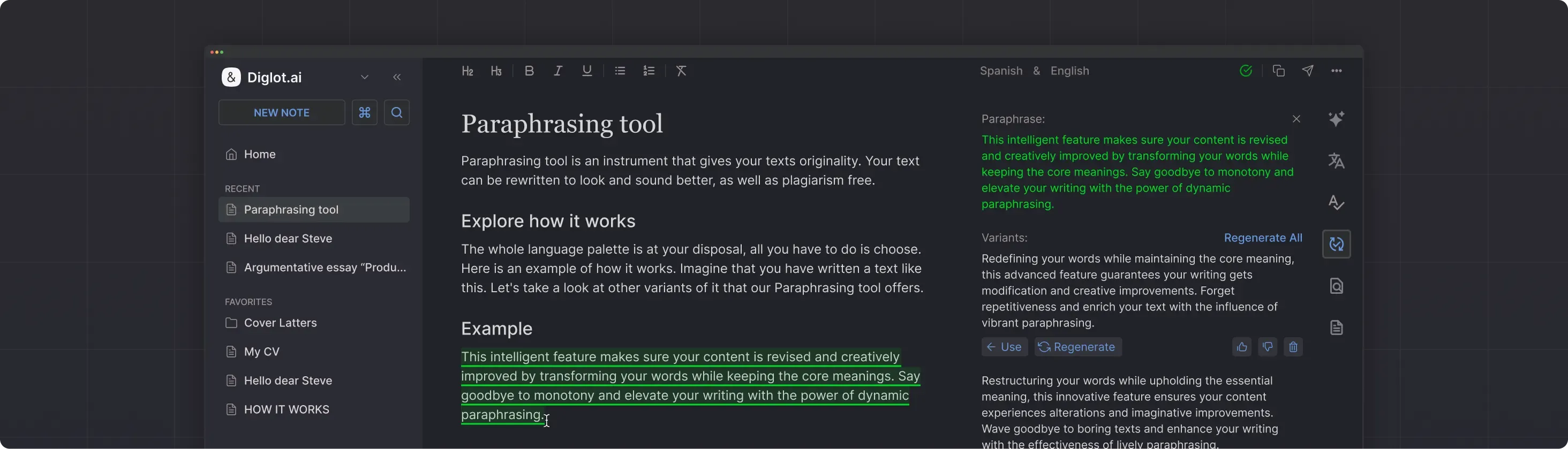
For paraphrasing alone, QuillBot remains a strong product with recognisable rewrite modes that work well on pasted sentences. Diglot pulls ahead when paraphrasing needs context from the rest of the document — for example, when the sentence sounds translated, too stiff, or unclear and you need the surrounding paragraph to decide what natural English should look like.
QuillBot is still good at what made it popular: fast paraphrasing with recognizable rewrite modes. If you want to paste in a sentence, pick a mode, and move on, it does that well.
Diglot becomes more useful when paraphrasing is not the end of the task. Many ESL writers paraphrase because the current sentence sounds translated, too stiff, or unclear. That means paraphrasing needs context from the draft, not just a detached input box.
Verdict
Choose QuillBot for fast standalone rewriting.
Choose Diglot when paraphrasing needs to stay connected to the document you are actively building.
Grammar and correction verdict
On grammar and correction, QuillBot can polish phrasing but the product was not built around grammar review as a primary use. Diglot treats grammar checking as a core part of the writing flow, with L1-aware suggestions for the patterns ESL writers repeat. That matters when a sentence is too rough to paraphrase usefully yet.
QuillBot can help improve phrasing, but grammar correction is not the central reason people use it. Diglot treats grammar review as part of the normal writing flow, which matters when a sentence is not ready for paraphrasing yet.
That difference becomes obvious in long-form writing. You often need to correct structure, punctuation, and phrasing before a rewrite is even worth evaluating.
Verdict
For rewrite-only use, QuillBot can be enough.
For drafting plus correction, Diglot has the stronger workflow.
Bilingual drafting verdict
Bilingual drafting is where the two products serve different jobs entirely. QuillBot operates on English text that already exists, so the workflow assumes the translation step has already happened elsewhere. Diglot is built for the moment before that, when the idea is still forming and the writer is moving between a first language and English in the same document.
QuillBot is mainly about rewriting English that already exists. Diglot is built for the moment before that, when the idea is still forming and the writer may be thinking in another language.
If your English writing process includes native-language documents, translation checks, or phrase comparison before you finalize the sentence, Diglot aligns better with the actual ESL workflow.
Verdict
For bilingual drafting into English, Diglot is the better fit by a wide margin.
Workflow depth verdict
On workflow depth, QuillBot is typically one tab among several. It works well if you already accept that serious writing means copying text between specialised products. Diglot takes the opposite approach by keeping translation, drafting, grammar review, paraphrasing, and originality checks inside a single document, which removes a large class of context switches.
QuillBot is often one tool among several tabs. It works well when you already accept that writing means copying text into specialized products as needed.
Diglot takes the opposite approach: keep the serious writing session in one workspace and let translation, paraphrasing, grammar review, and drafting happen there.
Verdict
Choose QuillBot if a lightweight rewrite tab is enough.
Choose Diglot if you want fewer context switches throughout the writing session.
Pricing and value verdict
QuillBot offers clear value when paraphrasing is the main problem you need to solve. Diglot offers better value when rewriting is only one part of the work and a single subscription replaces a translator, grammar checker, paraphraser, and plagiarism scanner. The practical question is which tool removes more friction from the workflow you repeat every week.
QuillBot offers clear value when paraphrasing is the main problem to solve. Diglot offers better value when rewriting is only one part of the work and you would otherwise need multiple tools to finish the document.
The practical question is not which tool is cheaper in isolation. It is which one replaces more friction in the workflow you repeat every week.
Verdict
If you mostly need paraphrasing, QuillBot can be efficient.
If you need drafting, translation, grammar help, and paraphrasing together, Diglot usually produces more value per session.
Final recommendation
Choose QuillBot if your use case is narrow and rewrite-shaped: paste a paragraph, try another phrasing, and move on. Choose Diglot if you are a non-native English writer who needs one workspace to draft from rough ideas, translate and compare wording in context, correct grammar before and after rewriting, and verify the result is original.
Choose QuillBot if your use case is narrow: rewrite this paragraph, try another phrasing, and move on.
Choose Diglot if you are a non-native English speaker who wants one place to:
- draft from rough ideas
- translate and compare wording in context
- correct grammar before and after rewriting
- paraphrase awkward English without losing meaning
- finish the document without switching tools
That is why Diglot works better as a QuillBot alternative for ESL writers. It does not only improve text that already exists. It helps you build better English from the first messy version to the final one.
If that is the workflow you need, the right next step is the owner page for this comparison: See the Paraphrasing workflow.