In this article
Plagiarism checkers are one of the most misunderstood writing tools, especially for non-native English speakers. Many ESL writers either avoid them out of anxiety or rely on the overall similarity percentage without understanding what the results actually mean.
Understanding how plagiarism checkers work — and when you actually need one — makes them far more useful.
What Plagiarism Checkers Actually Detect
A plagiarism checker compares your text against a large database of published articles, academic papers, web pages, and sometimes previously submitted student work, then highlights matching or very similar phrases. It does not determine intent — it cannot distinguish deliberate copying from accidental similarity, common phrasing, or properly cited quotation. That judgment is yours.
What it does not do is determine intent. It cannot tell the difference between deliberate copying, accidental similarity, common phrases, and properly cited quotations. That judgment is yours.
This means the similarity percentage alone is not a verdict. A paper with 25 percent similarity might be perfectly fine if most matches are direct quotes with citations. A paper with 5 percent similarity might have a problem if that 5 percent is an uncited passage from a key source.
Why ESL Writers Should Use Plagiarism Checkers
Non-native English speakers have a specific reason to use plagiarism checkers beyond academic honesty. Paraphrasing from sources is a core part of how ESL writers learn English, and rewrites often stay too close to the original phrasing — patchwriting that institutions still treat as plagiarism. A checker catches that drift before submission so you can rewrite further with confidence.
When you read a well-written English source and try to express the same idea in your own words, the result sometimes stays too close to the original phrasing. This is called patchwriting — and most institutions treat it as plagiarism even though the intent was not to deceive.
A plagiarism checker catches patchwriting before you submit. It shows you exactly which phrases are too similar and need further rewriting. For ESL writers, this is protective rather than punitive.
Fragment-Level Checking vs. Whole-Document Scanning
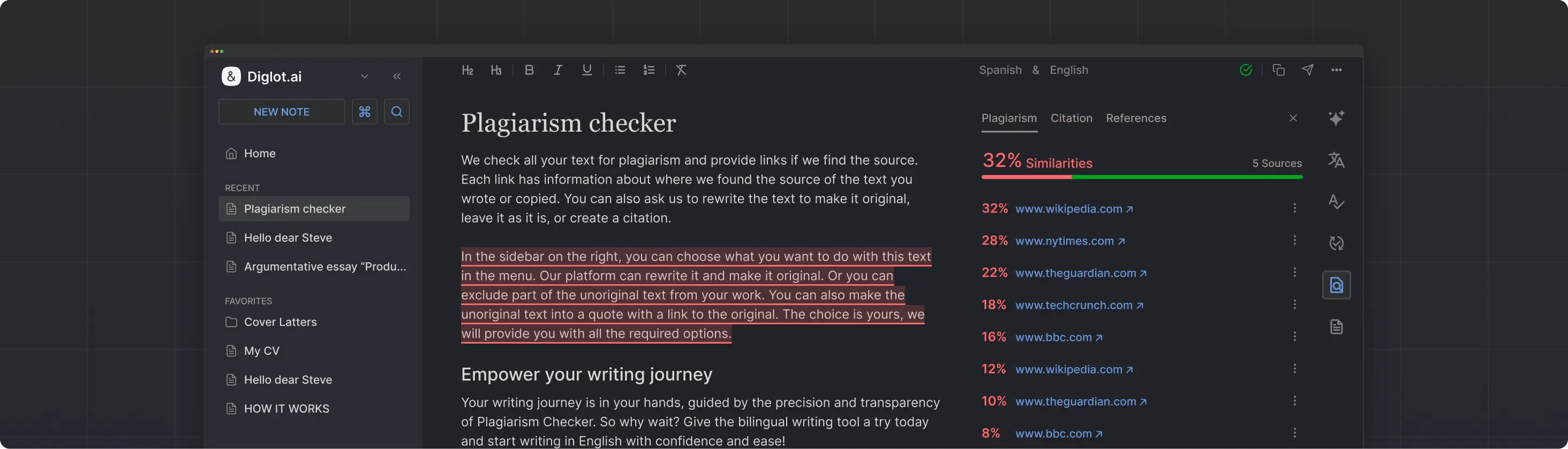
The most useful plagiarism checkers show exactly which phrases match the database, not only an overall percentage. Fragment-level highlighting lets you see the specific words that triggered each match and decide one by one whether the phrase needs rewriting, a citation, or no action because it is common technical language that appears across many published documents.
Some matches are genuine concerns — an uncited paraphrase, a sentence you copied from notes and forgot to rewrite. Others are false positives — common academic phrases, technical terminology, or standard expressions that appear in many texts.
Diglot's plagiarism checker uses fragment-level highlighting so you can make these decisions for each match rather than guessing based on a percentage.
When to Run a Plagiarism Check
Plagiarism checks earn their keep at four moments: immediately after paraphrasing from sources, before submitting any academic work, after AI-assisted rewriting where the output may mirror training data, and when reusing your own previous work to avoid self-plagiarism. Running the check on raw notes or first-draft text wastes effort because the writing has not stabilised yet.
After paraphrasing from sources. This is the most important time. If you rewrote content from a research paper or article, check that your version is genuinely different in structure and phrasing.
Before submitting academic work. Universities increasingly use plagiarism detection on submitted papers. Running your own check first gives you a chance to fix issues before your professor sees them.
After AI-assisted rewriting. If you used an AI tool to paraphrase or rewrite content, verify that the output is original. AI rewriters sometimes produce text that closely mirrors patterns in their training data.
When reusing your own previous work. Self-plagiarism — submitting the same text to multiple courses or publications — is also detected by plagiarism checkers. If you are building on previous work, make sure you have rewritten sufficiently or have permission to reuse.
Plagiarism Checking as Part of the Writing Workflow
The most effective way to use a plagiarism checker is as the last step in a connected workflow: draft, translate if needed, correct grammar, paraphrase for clarity, and only then check originality. Running the check on text that is still being rewritten produces noisy results. Saving it for the final pass keeps the report meaningful and actionable.
In Diglot, this entire sequence happens in one workspace. The plagiarism check runs on the same document where you drafted, translated, and paraphrased — so you can immediately see whether your rewriting was effective and fix any remaining issues without switching tools.
Try Diglot for free — check originality, fix grammar, and paraphrase in one connected workspace.