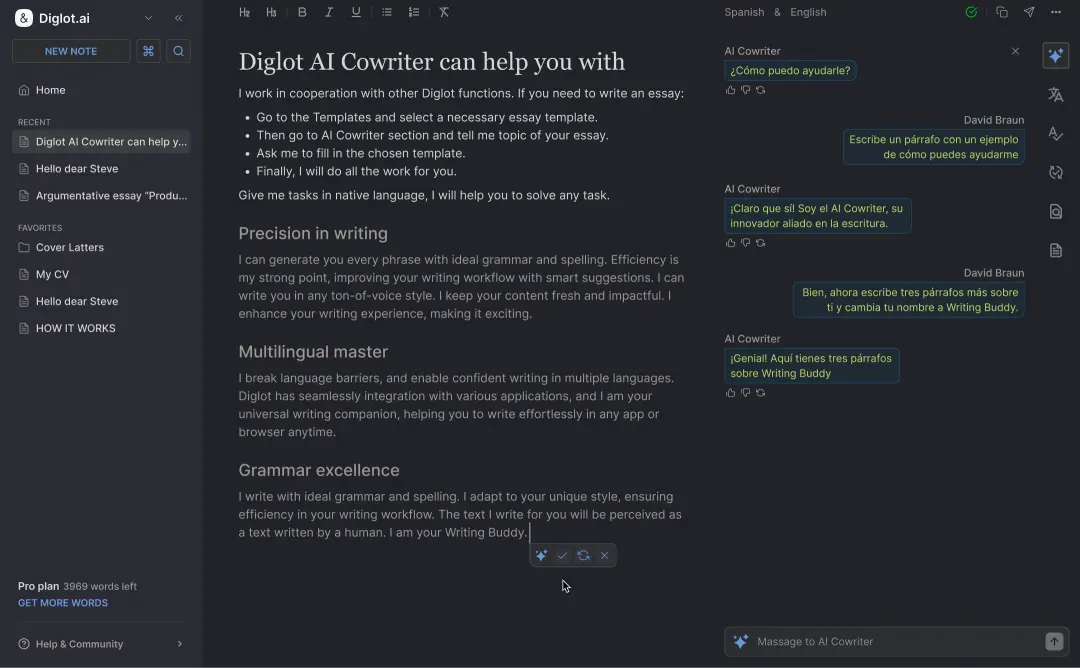
ESL Writing Tool for Non-Native English Speakers
Diglot is the only writing tool built ground-up for ESL writers. L1-aware grammar checking, three-tier translation, contrastive paraphrasing, and originality verification share one editor — calibrated for the six most common L1s (Korean, Chinese, Japanese, Spanish, Russian, Arabic). Stop juggling Grammarly + DeepL + QuillBot + Turnitin; ship cleaner English in a single workflow.
Generic English writing tools (Grammarly, Wordtune, ChatGPT) were trained on native-English writing and treat ESL writers as if they were just sloppy natives. The real fixes — recognizing Korean topic-comment word order, Spanish false cognates, Chinese aspect-marker drops, Russian long subordinate chains — require L1-aware contrastive linguistics, which is exactly what Diglot is built around.
- L1-aware grammar — explains corrections with the native-language reason, not generic English rules
- Bilingual workspace — keep L1 source visible while you draft and polish the English
- Translation memory — approved phrasings persist across every document you write
What an ESL writing tool needs that generic English tools miss
Generic English writing tools (Grammarly, Wordtune, ChatGPT) were trained on native-English writing and treat ESL writers as if they were just sloppy natives. The real fixes — recognizing Korean topic-comment word order, Spanish false cognates, Chinese aspect-marker drops, Russian long subordinate chains — require L1-aware contrastive linguistics, which is exactly what Diglot is built around.
Six L1s covered with deep contrastive data: Korean (article omission, -고/-며 connectors), Chinese (aspect markers, tense flattening), Japanese (keigo, topic-comment), Spanish (false cognates, subjunctive), Russian (no articles, long subordinates), Arabic (definite-article overuse, VSO/SVO). Each pattern explained in your L1.
Generic ESL workflow: DeepL for translation, Grammarly for grammar, QuillBot for paraphrase, Turnitin for originality — four tabs, four copy-pastes, lost context every switch. Diglot keeps all four inside one editor with shared document context.
Academic researchers writing journal papers, business professionals writing client emails, marketers producing English content, students submitting essays. Every workflow is built around bilingual drafting (L1 source → English output), not native-English polishing.
How this workflow works
Move from bilingual rough ideas to polished English in one calm flow instead of stitching together separate tools.
Think in your own language first
Capture the idea without forcing perfect English from the first sentence.
Translate and draft together
Move from native-language thinking to English output in the same editor, using translation only when it helps the writing.
Rewrite for fluency and tone
Use paraphrasing and grammar guidance to make the English version clearer, more natural, and better matched to the audience.
Finish with more confidence
Deliver work that sounds stronger in English without the context loss that comes from switching between six separate tools.
What you can do with Diglot
Use this workflow to move from bilingual drafts to cleaner English output without breaking your editing flow across separate tools.
One calm path from rough idea to final English
Diglot keeps drafting, translation, grammar review, and rewriting inside the same workspace so you do not have to move text across disconnected tools.
- Native-language documents stay useful
- Translation sits inside the editor
- The final target stays polished English
The workflow starts from how ESL users actually think and write rather than assuming perfect English from the first sentence.
- Native-language documents stay useful
- Translation sits inside the editor
This setup removes the constant tab switching that usually slows bilingual writing down.
- Draft, translate, grammar, paraphrase
- Originality checks when needed
What this module includes
The module is not just one button. It is a focused part of the Diglot workspace with real writing actions, review controls, and context-aware output.
Bilingual-first by design
The workflow starts from how ESL users actually think and write rather than assuming perfect English from the first sentence.
- Native-language documents stay useful
- Translation sits inside the editor
- The final target stays polished English
One workspace instead of six
This setup removes the constant tab switching that usually slows bilingual writing down.
- Draft, translate, grammar, paraphrase
- Originality checks when needed
- One document instead of tool hopping
Built to build confidence
Every module is there to reduce hesitation and help you trust what you are about to submit or send.
- Improve clarity while drafting
- Learn from rewrites and fixes
- Keep your own meaning intact
Who this is built for
Diglot works best when English is your output language but not always your thinking language.
International students
Move from rough documents to cleaner English submissions with structure, paraphrasing, grammar review, and originality checks in one place.
Multilingual professionals
Write faster for work without sounding translated. Diglot helps you refine tone, clarity, and confidence before you hit send.
Bilingual creators
Turn ideas that start in your native language into natural English copy without bouncing between translation and rewrite tools.
Why trust this workflow
This page is written for non-native English speakers and reviewed against the current Diglot workflow, not against a generic AI copy template.
Built around real bilingual writing tasks
The guidance on this page reflects how Diglot handles drafting, translation, grammar review, paraphrasing, and originality checks inside one editor.
Written for people who think in one language and deliver in English
Examples, copy, and workflow steps are shaped for students, professionals, and creators who need clearer English output without losing meaning.
Reviewed by Diglot Editorial Team
Last reviewed on April 11, 2026. We update these landing pages when the workflow, module behavior, or recommended writing path changes.
Frequently asked questions
Everything you need to know before getting started.
Diglot is built ground-up for second-language writing workflows. Every tool — grammar checker, translator, paraphraser, originality checker — is calibrated for non-native English speakers. The grammar checker recognizes L1-specific transfer patterns. The translator offers three alternative renderings (literal/idiomatic/formal). The paraphraser handles L1-flavored sentences without losing meaning. Generic English tools were never designed for this workflow.
No — Diglot is built for any non-native English speaker who writes English regularly. Students writing essays, theses, and grant abstracts. Academic researchers preparing journal submissions. Business professionals writing client emails, sales proposals, and executive presentations. Content marketers producing English blog posts and landing pages. Founders communicating with English-speaking investors. The bilingual workflow applies across all these contexts.
Six L1s with deep L1-aware coverage: Korean, Chinese (Mandarin), Japanese, Spanish, Russian, and Arabic. Each language has a contrastive linguistics database covering its specific transfer patterns into English. Fourteen additional L1s have partial coverage (German, French, Italian, Portuguese, Hindi, Turkish, Vietnamese, Polish, Ukrainian, Thai, Indonesian, Tagalog, Bengali, Farsi) — expanding monthly.
Yes — that is a deliberate design goal. Diglot does not just fix errors; it explains each correction with the L1 reason (why Korean writers omit articles, why Spanish writers fall for false cognates, why Chinese writers flatten tense). Over time, ESL writers internalize the patterns and produce cleaner first drafts. Generic checkers explain corrections as if you were a native — Diglot explains them as if you were learning.
No — formal English instruction (grammar courses, business writing classes, academic writing workshops) is still the foundation. Diglot is a workflow tool for ESL professionals and students who already have functional English and need a calibrated editing layer for daily writing. The L1-aware explanations help internalize patterns, but they complement formal study rather than replace it.
Diglot keeps your L1 source anchored on screen while you draft the English version, so you never lose context during translation. The translator offers three renderings (literal, idiomatic, formal) so you pick what fits your reader. The grammar checker recognizes L1-transfer patterns specific to your native language. The paraphraser rewrites L1-flavored sentences into natural English. All four tools share document context, so the bilingual workflow stops requiring tab juggling.
See what each Diglot workflow includes
Explore the writing tasks covered by every Diglot workflow before you jump into related guides and deeper comparisons.
Draft, refine, and rewrite English with AI support built for non-native speakers.
Translate, compare, and edit multilingual text in one writing workflow.
Catch grammar, spelling, and punctuation issues while you write in English.
Rewrite sentences, improve fluency, and keep your original meaning clear.
Scan content for overlap and protect originality before submission or publishing.
Start from ready-made structures for essays, emails, reports, and proposals.
Cryptographically signed proof you wrote your own text — defends against false AI-flag accusations.
Write in your language,
publish in English
Move from rough bilingual drafts to clearer English in one connected writing workflow.
An ESL writing tool needs to do more than offer English-language utilities — it needs to be calibrated for the specific challenges non-native English speakers face when writing English. Generic English writing tools (Grammarly, Wordtune, ChatGPT) were trained on native-English baselines and treat ESL writers as if they were sloppy natives. They miss the predictable patterns: Korean writers omit "the" in front of specific nouns because Korean has no article system; Chinese writers flatten English tense because Mandarin does not inflect verbs; Spanish writers substitute "actually" for "actualmente" without realizing the false cognate flips meaning; Japanese writers over-formalize US business English because keigo register cues do not map to American neutral; Russian writers chain long subordinate clauses because Slavic academic style rewards length; Arabic writers overuse "the" because of L1 definite-article patterns. Each of these is a predictable L1-transfer pattern grounded in contrastive linguistics, not random error. Diglot is the only writing tool built around L1-aware contrastive linguistics. The grammar checker explains corrections with the L1 reason. The translator offers three alternative renderings (literal/idiomatic/formal) so you choose what fits your reader. The paraphraser rewrites L1-flavored sentences into natural English without losing your meaning. The originality checker recognizes translation-derived overlap. All four tools share document context inside a bilingual editor that keeps your L1 source anchored on screen the whole time — so the workflow stops requiring four tabs and four copy-pastes. Six L1s covered deeply (Korean, Chinese, Japanese, Spanish, Russian, Arabic); fourteen more expanding monthly. Free for individuals; Spark and Pro plans for higher quotas and premium models.