
AI Grammar Checker for ESL & Non-Native English Writers
Diglot is purpose-built for ESL and non-native English writers. It catches the L1-specific patterns generic checkers miss — missing articles, copula drops, false cognates, and translated-sentence rhythm — while you draft, so you ship clean English without copy-pasting between Grammarly, LanguageTool, and your translator.
*No credit card required
What makes a grammar checker built for ESL writers different
Generic grammar checkers were trained on native-English writing, so they flag awkwardness but rarely explain why a non-native sentence reads wrong. Diglot is calibrated against L1-transfer patterns — missing articles in Methods sections, copula drops in academic English, false cognates from Spanish or French, and topic-comment word order from Korean and Japanese.
Apologetic fluff & boilerplate
Defaults to verbose, deferential openings ("I hope this email finds you well", "I am writing to kindly inquire"). Reads as subordinate and wastes senior stakeholders' time.
Native-speaker syntax bias
Catches basic comma splices and spelling typos, but completely misses L1 cultural transfers, Japanese Keigo servility, Spanish false cognates, or tone mismatch.
Isolated sentence translation
Translates sentences accurately in isolation, but lacks document-level tone calibration, context memory, and consistent business terminology across releases.
Calibrated executive workspace
In-place three-tier translation, register calibration, L1-transfer neutralization, and persistent translation memory inside a single focused editor.
Built around real bilingual business workflows
Everything non-native professionals need to write, translate, and verify high-stakes English in one place.
Register & Formality Calibrator
Calibrate writing to target US vs UK executive norms. Neutralize Keigo-style subservience, legalese filler, and culturally awkward greetings before sending to leadership.
- Senior Executive vs Peer tone tuning
- Eliminates "kindly", "as per", and "revert"
- Action-oriented CTA phrasing
Three-Tier Inline Translation
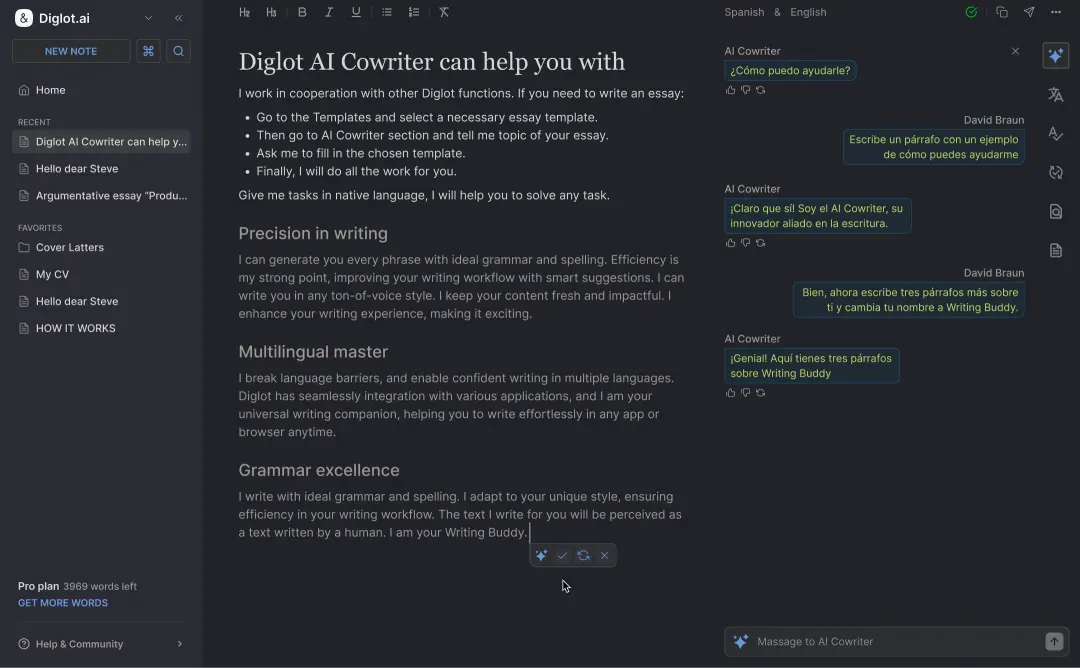
Translate difficult words or full sentences inline without leaving the editor. View Literal, Idiomatic, and Executive Business translations side-by-side.
- In-place paragraph translation
- Literal vs Idiomatic vs Executive tiers
- Preserves source context and document formatting
Persistent Translation Memory
Brand names, product terms, contractual clauses, and company acronyms stay 100% consistent across every email, proposal, and report you write.
- Locked vocabulary across documents
- Shared team glossaries
- Zero terminology drift between releases
AI Cowriter for Business Formats
Transform rough bullet points, meeting notes, or native-language thoughts into polished client emails, status memos, and executive decks in seconds.
- Instant expansion of rough bullet notes
- Calibrated for non-native thinking habits
One connected workflow from raw draft to final deliverable
Move from bilingual rough ideas to polished English in one calm flow instead of stitching together separate tools.
Draft naturally first
Write your paragraph without stopping for every small error or awkward phrase.
Scan inline issues fast
Diglot marks spelling, grammar, punctuation, capitalization, and style issues directly in the editor.
Fix what matters most
Accept one suggestion, ignore a rule, or correct multiple issues at once without losing your place in the draft.
Use grammar as part of revision
Turn grammar review into a drafting step instead of a separate proofreading session at the very end.
Built for high-stakes business communicators
Diglot works best when English is your delivery language, but not always your thinking language.
International students
Move from rough documents to cleaner English submissions with structure, paraphrasing, and grammar review in one place.
Researchers and graduate writers
Keep academic structure and wording quality in one workflow when your final output needs to sound precise and credible.
Multilingual professionals
Write faster for work without sounding translated. Diglot helps you refine tone, clarity, and confidence before you hit send.
Confidentiality & editorial standards
Your business drafts, customer proposals, and internal communications belong strictly to your team.
Zero model training on your data
Your drafts, emails, and translations are never used to train public AI models. Data is encrypted in transit and at rest with strict multi-tenant isolation.
Calibrated specifically for non-native professionals
Examples, register models, and workflow conventions are shaped for managers, engineers, and consultants who need confident English output without losing meaning.
Reviewed by Diglot Editorial Team
Page updated May 22, 2026. We regularly update guidelines as international business English standards and corporate communication norms evolve.
Frequently asked questions
Everything you need to know before getting started.
Is this a free online grammar checker?
Yes — Diglot has a free plan with core grammar checking, paraphrasing, and translation in one editor. Free includes L1-aware corrections for the top six L1s (Korean, Chinese, Japanese, Arabic, Spanish, Russian). Spark ($19/month) and Pro ($34/month) unlock higher word quotas, larger document sizes, and premium model tiers for more accurate corrections.
Can it fix both grammar and spelling?
Yes — grammar, spelling, punctuation, capitalization, sentence clarity, and tone all check inside one pass. Unlike split tools where you have to switch between a spell checker and a separate grammar checker, Diglot surfaces every error category in the same inline review — and explains corrections in plain language, including the L1 reason when relevant.
Is it good for non-native English speakers?
Yes — Diglot is built for non-native English speakers writing in English. The checker recognizes patterns generic tools treat as random "errors": article omissions from Korean, Japanese, Chinese, and Russian L1s; preposition errors from Spanish, German, and French; tense-marker drops from Mandarin; topic-comment word order from Korean and Japanese. Each fix is explained in your L1 context.
Can I use it during drafting instead of after writing?
Yes — Diglot works best as you draft, not as a post-write proofreading layer. Corrections surface inline as you type, the paraphraser sits next to your cursor, and the translator anchors your L1 source on screen the whole time. This means you fix patterns as they appear instead of accumulating them across an 8,000-word draft you then have to rebuild paragraph-by-paragraph.
Does it catch ESL-specific grammar mistakes?
Yes — that is the point. Diglot maintains an L1-transfer-pattern database for each supported language: Korean -고/-며 connector chains producing English comma splices, Japanese topic markers becoming awkward English subjects, Chinese aspect markers (le, guo, zhe) mapping to wrong English tenses, Arabic definite-article overuse, Spanish subjunctive overcorrection. Generic checkers treat each as a one-off — Diglot recognizes the pattern.
Can I combine grammar checking with translation and paraphrasing?
Yes — all three core tools (grammar checker, paraphraser, AI translator) share the same document context inside Diglot. Translate a paragraph from Korean or Spanish, run a grammar pass on the English result, then paraphrase any awkward sentences without losing the surrounding draft. Generic stacks force three browser tabs and three copy-pastes — Diglot keeps it in one editor.
Explore all Diglot workflows
Discover specialized tools built to support your English writing from rough notes to polished delivery.
Draft, refine, and rewrite English with AI support built for non-native speakers.
Translate, compare, and edit multilingual text in one writing workflow.
Catch grammar, spelling, and punctuation issues while you write in English.
Rewrite sentences, improve fluency, and keep your original meaning clear.
A signed, verifiable record of how your text was written inside Diglot — writing-process evidence you can share.
Grammar Checker for speakers of:
Diglot's checker models L1-to-English transfer patterns for each language family. Pick yours for the patterns we specifically address.

Use Diglot's AI grammar checker to fix grammar, punctuation, spelling, and clarity issues while you write in English.

Writing in English when it's not your first language is hard — but not because your ideas are weak. Here are 7 practical strategies to write faster, clearer, and more confidently.
Three different answers to one question: detectors do not care that it was Grammarly, some university policies name it explicitly, and students have been penalised. What matters is the function you used — spellcheck and rewrite are not the same act. Sourced, dated, and checked against the vendors own documentation.
Write in your language,
publish in English
Move from rough bilingual drafts to clearer English in one connected writing workflow.
An AI grammar checker for non-native English speakers needs to do more than find typos. The hard cases for ESL writers aren't spelling mistakes — they're the L1-transfer patterns that pass standard checkers as "grammatical English" but read as obviously non-native to a journal reviewer or a hiring manager. A Korean writer drops "the" in front of specific nouns because Korean has no article system. A Chinese writer flattens English tense because Mandarin doesn't inflect verbs.
A Spanish writer substitutes "actually" for "actualmente" without realizing the false cognate flips the meaning. A Russian writer chains long subordinate clauses with reflexive participles because Russian academic style rewards length. Each pattern is invisible to a generic checker calibrated against native-English baselines — and each is sharply visible to a reader who decides whether your paper, email, or proposal gets the response you want. Diglot is the only grammar checker explicitly built around these L1-transfer patterns.
The corrector maintains a per-L1 database of contrastive linguistic patterns drawn from published ESL research and live error corpora, then explains each fix with the L1 reason — so revisions compound across drafts rather than restarting on every document. Diglot also keeps grammar checking, AI translation, and paraphrasing inside the same editor, so your bilingual workflow stops requiring three browser tabs and three copy-pastes.
The result: writers who think in Korean, Chinese, Japanese, Arabic, Spanish, or Russian can publish English that reads as if a native-English colleague edited it, without the round-trip through three competing AI tools.
